


Buyer’s guide · Website development Canada
Website Development Costs in Canada: A 2026 Small-Business Budget Guide
Ask five Canadian agencies to quote “a website” and you will get numbers from $1,500 to $50,000 — all technically honest. This guide explains what website development services actually include, realistic 2026 price ranges by project type, what pushes quotes up or down, and the ongoing costs nobody puts on the proposal. Written for business owners budgeting a real project, not for developers.
What “website development services” actually include
A serious web project is more than design and code. When you compare quotes, check which of these each one covers — missing items do not disappear; they become change orders later:
- Discovery and planning: goals, audiences, sitemap, and a content plan. Skipping this is how projects end up redesigned twice.
- Design: from “apply brand colours to a template” to full custom design systems — the single biggest cost lever (more below).
- Development: building the site on a CMS (usually WordPress for small business), responsive layouts, forms, and speed basics.
- Content migration or creation: moving existing pages, or writing new copy and sourcing images.
- SEO preservation: URL mapping and 301 redirects if you have an existing site with rankings.
- Launch and training: DNS cutover, analytics, and showing your team how to edit pages safely.
- Warranty and handoff: a defect period after launch, documentation, and clarity about who owns what.
Realistic 2026 price ranges by project type

| Project type | Typical range (CAD) | Timeline | What you get |
|---|---|---|---|
| Brochure site (5–8 pages) | $2,500 – $6,000 | 3–6 weeks | Template-based design, contact form, mobile-ready, basic SEO setup |
| Business website (10–20 pages) | $4,000 – $10,000 | 6–10 weeks | Custom or hybrid design, lead funnels, blog, integrations like booking or CRM |
| Ecommerce store | $8,000 – $25,000 | 8–16 weeks | WooCommerce/Shopify build, payments, shipping and tax setup, product import |
| Custom web application | $15,000 – $40,000+ | 3–6+ months | Portals, dashboards, member areas, custom databases and APIs |
Two calibration notes. First, these assume Canadian professionals; overseas teams quote far less, with trade-offs in communication, revisions, and long-term supportability. Second, custom website development services — where design and functionality are built from scratch rather than assembled — start near the top of each range. That is not padding; it is the difference between assembling furniture and carpentry. For a deeper look at how a WordPress project runs, see our WordPress development services; for portals and software-like builds, see web application development.
Why quotes vary 5–10× for the “same” website

- Design approach. Configuring a premium theme costs hours; designing from wireframes costs weeks. Both can be right — a template is fine when your brief is simple, custom pays off when differentiation and conversion matter.
- Unique layouts, not page count. Forty pages built from five templates is a modest project. Twelve pages that each need bespoke design is a bigger one. Quotes based on “number of pages” alone are a warning sign either way.
- Integrations. Every external system — CRM, booking, payment provider, inventory, email marketing — adds configuration, edge cases, and testing time. List them all up front.
- Content readiness. Copywriting and photography add real cost when the agency provides them, and add real delay when you promise to provide them and don’t. Decide honestly which side of that trade you are on.
- Migration and SEO. Replacing a site that already ranks requires a URL inventory, redirect map, and post-launch monitoring. It is cheap insurance compared to rebuilding lost traffic — the core of our redesign-without-losing-SEO process.
- Website application development. The moment the site needs logins, saved data, or workflows (quotes, bookings, client portals), you have left “website” pricing and entered software pricing. Scope that separately.
The ongoing costs nobody quotes
The build price is not the budget. A realistic year-two line for a Canadian small-business site:
| Item | Typical monthly (CAD) | Notes |
|---|---|---|
| Hosting | $5 – $60 | Shared to managed WordPress; ecommerce and high-traffic sites higher |
| Maintenance | $90 – $160 | Updates, backups, security, small fixes — see our maintenance checklist for what this covers |
| Plugin/theme licences | $10 – $50 | Premium forms, page builders, WooCommerce extensions |
| Domain + email | $5 – $20 | Domain renewal, business email accounts |
Call it $100–$250/month all-in for a professionally maintained site. If a proposal shows $0 for maintenance, the plan is that you will call — at hourly emergency rates — when something breaks.
Freelancer vs agency vs offshore
- Freelancer ($60–120/hr): best value for straightforward sites when you find a good one. Risks: availability, bus factor, and support gaps when they get busy or move on.
- Local small agency ($90–150/hr): more process, backup coverage, and accountability; costs more. The sweet spot for most established small businesses.
- Offshore team ($15–50/hr): can work with an experienced manager on your side and an airtight written scope. Without those, revision cycles and communication overhead usually consume the savings.
Whichever route you choose, evaluate them the same way — portfolio depth, communication, SEO awareness, and post-launch support. Our guide to choosing a website design firm gives you the seven-point scorecard.
How to reduce the cost without regretting it
There are good ways to spend less and expensive ways to spend less. The good ones:
- Phase the project. Launch with the core pages and one conversion path; add the blog, portfolio, or second language in phase two once the site is earning. Vendors respect this; it also reduces decision fatigue.
- Accept a quality template for a simple brief. A well-chosen theme configured by someone competent beats a mediocre custom design at three times the price.
- Have content genuinely ready. Final copy and images before development starts is the single biggest schedule (and therefore budget) protector.
- Reduce integrations at launch. Start with a form and a calendar link; wire the CRM automation once you know the lead flow is real.
The expensive ways to save: skipping the redirect plan on a migration (traffic loss costs more than the mapping), skipping maintenance (emergencies bill hourly at the worst time), and choosing a vendor purely on price (the rebuild two years later is the real quote). We regularly rebuild sites that were “saved money on” — it is cheaper to scope honestly the first time.
How to get comparable quotes (the 10-line RFP)
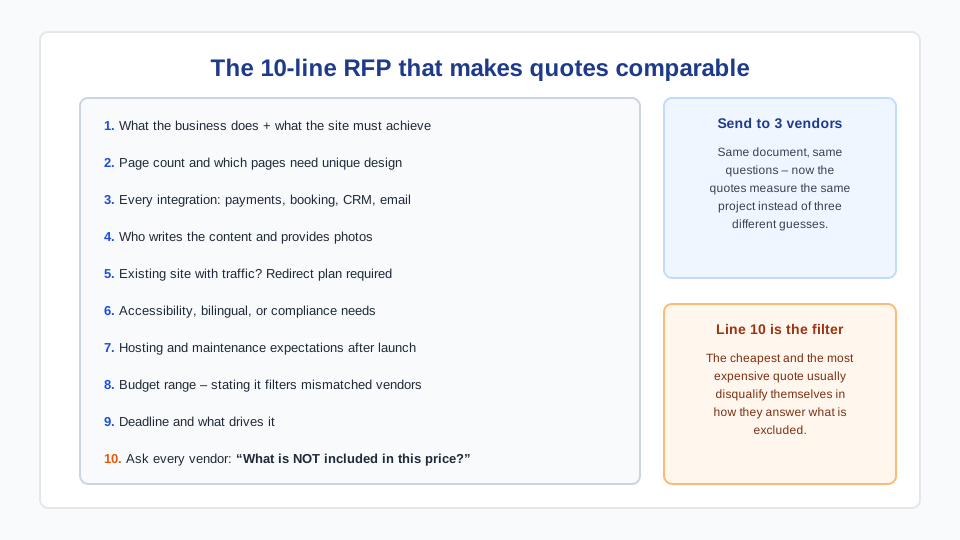
- What the business does and what the website must achieve (leads, sales, bookings).
- Number of pages and which ones need unique design.
- Every integration: payments, booking, CRM, email marketing, inventory.
- Who writes the content and provides the photos.
- Whether an existing site with traffic is being replaced (redirect plan required).
- Accessibility, bilingual, or compliance requirements.
- Hosting and maintenance expectations after launch.
- Budget range — stating it filters out mismatched vendors and saves everyone time.
- Deadline and what drives it.
- Ask each vendor the same question: “What is not included in this price?”
Send that to three vendors and the quotes become comparable. The cheapest and the most expensive will usually disqualify themselves in how they answer line 10.
Frequently asked questions
How much does a website cost in Canada in 2026?
For professionally built small-business sites: roughly $2,500–$6,000 for a template-based brochure site, $4,000–$10,000 for a custom business site, $8,000–$25,000 for ecommerce, and $15,000+ for custom web applications. DIY builders cost less in cash and more in time; enterprise agencies charge multiples of these ranges.
Why do website quotes vary so much?
Because “a website” hides the real variables: template vs custom design, how many unique layouts, which integrations, who writes the content, and whether an existing site’s SEO must be preserved. Two honest vendors reading the same vague brief can scope wildly different projects. A written 10-line scope makes quotes comparable.
What is the difference in cost between a template and custom design?
Typically 2–4×. Configuring a quality premium theme might take 15–30 hours; designing and building custom layouts from wireframes takes 60–150+. Templates are the right call for simple brochure sites; custom earns its cost when brand differentiation, conversion optimization, or unusual functionality is central to the project.
How much does a custom web application cost in Canada?
Budget from $15,000 for a focused tool (a quote calculator, a small client portal) to $40,000–$100,000+ for multi-role systems with dashboards, payments, and third-party APIs. Application pricing is driven by workflows and edge cases rather than pages, which is why it should always be scoped separately from marketing-site work.
What are the monthly costs after a website launches?
Realistically $100–$250/month: hosting ($5–60), maintenance including updates, backups and security ($90–160), plugin licences ($10–50), and domain/email ($5–20). Ecommerce runs higher. A proposal with no maintenance line means breakages get handled reactively at hourly rates — usually the more expensive path over a year.
How do I compare website quotes fairly?
Give every vendor the same written scope (pages, unique layouts, integrations, content ownership, redirect plan, deadline) and ask each the same closing question: “What is not included in this price?” Compare answers, not totals. The vendor who identifies risks and exclusions clearly is usually the one who will also manage the project clearly.