


WordPress maintenance · Updated August 1, 2026
WordPress Maintenance: The Complete Checklist for Business Websites
Website maintenance is the recurring work that keeps a business website secure, fast, backed up, searchable and able to convert visitors into leads. For WordPress sites — which power most small-business websites in Metro Vancouver — maintenance is not optional and it is not just clicking “update” and hoping. This guide gives you the full checklist: what WordPress maintenance includes, how often each task should happen, what it costs, and when a maintenance plan beats doing it yourself.
- 1–6 monthsScheduled update cadence selected by site risk and change rate
- WeeklyBetter for WooCommerce, membership and lead-heavy sites
- FormsLead capture tested after every update pass
- CWVCore Web Vitals reviewed for search and conversion
Why WordPress maintenance matters more than it looks
WordPress runs on a stack of moving parts: core software, a theme, somewhere between ten and forty plugins, PHP on the server, and a database. Each part ships updates on its own schedule, and every update is a small chance for something to conflict. Skip maintenance for six months and you are not running “the same site” — you are running an increasingly outdated one that attackers can fingerprint in seconds and that modern browsers and Google measure unfavourably.
The failures are rarely dramatic at first. A contact form silently stops emailing. An SSL certificate lapses over a long weekend. A plugin update conflicts with the theme and produces the dreaded “There has been a critical error on this website” screen. Each of those quietly burns leads and rankings you paid to earn. WordPress site maintenance is the discipline that catches these before your customers do.
The maintenance cycle: do the steps in this order

- Backup first. Files and database, stored off the web server (cloud storage, not a folder on the same hosting account). If the update pass goes wrong, this is your undo button.
- Update deliberately. WordPress core, then plugins, then the theme — reading changelogs for anything major, one at a time for high-risk plugins like WooCommerce or page builders.
- Test what makes money. Load the homepage and key landing pages, submit the contact form, run a test checkout or booking. Updates that “succeeded” still break forms silently.
- Check security. Malware scan, unfamiliar admin accounts, failed-login spikes, SSL expiry, and plugins that are deactivated or abandoned by their developers.
- Optimize. A quick Core Web Vitals check, database cleanup, broken-link scan, and a look at Search Console for new errors.
- Write it down. What was updated, what broke, what was fixed. When something fails three weeks later, this log is the difference between a ten-minute diagnosis and an afternoon of guessing.
What a good maintenance plan covers
Software updates
WordPress core, plugins, themes, PHP compatibility and dependency review before changes reach production — with rollback ready when an update ships a bug.
Backups and restore readiness
Off-site backups, retention review, restore tests and pre-update snapshots for risky changes. A backup that has never been restored is a hope, not a plan.
Security monitoring
Login hardening, WAF review, malware scans, suspicious file review, user-account audits and a clear incident-response path if something gets through.
Performance and forms
Core Web Vitals, caching, image weight, uptime monitoring, contact forms, checkout flows and email delivery — the parts that turn visitors into revenue.
The WordPress maintenance schedule: weekly, monthly, quarterly

Weekly (stores, bookings, and lead-heavy sites)
- Confirm backups actually completed — check the log, not your assumptions.
- Apply security releases for plugins and themes (these should not wait for month-end).
- Scan uptime reports and PHP error logs for anything new.
- Run a malware / file-integrity scan.
- Submit the contact form and confirm the notification arrives — if your site’s emails have a history of going missing, fix the root cause with our guide to WordPress emails not sending.
- Run a test transaction through checkout or booking if you take payments.
- Review failed-login spikes and block abusive IPs.
- Clear comment spam and moderation queues.
Monthly (the minimum for every business website)
- Update WordPress core, then run the full plugin and theme update pass (after the backup).
- Spot-check Core Web Vitals on your top pages with PageSpeed Insights.
- Optimize the database: clear post revisions, transients, and orphaned tables from removed plugins.
- Crawl for broken links and check Search Console for new 404s and coverage errors.
- Review user accounts and roles — departed staff and mystery admins are a top attack path.
- Check disk usage and email deliverability (SPF/DKIM still passing).
Quarterly (the deep checks everyone skips)
- Restore a backup to a staging environment. This is the single most skipped task in WordPress maintenance and the one that saves businesses.
- Delete unused plugins and themes entirely — deactivated code is still attackable code.
- Review the PHP version and plan upgrades before the host forces one.
- Audit passwords, 2FA coverage, and who holds hosting/domain/email access.
- Check plugin licences and renewals so premium plugins keep receiving updates.
- Do a content and SEO refresh pass: outdated pricing, stale pages, missing internal links.
- Run a full-site speed audit and review whether your hosting still fits your traffic.
Hosting and maintenance are different jobs
| Area | Hosting | Maintenance |
|---|---|---|
| Server environment (PHP, database, uptime) | Yes | Reviewed when performance or incidents require it |
| WordPress core / plugin updates | Sometimes | Yes, with testing and rollback |
| Form and checkout testing | No | Yes |
| Malware scans and cleanup | Rarely | Yes |
| SEO hygiene (broken links, redirects, Search Console) | No | Yes |
| Content edits and small fixes | No | Usually included up to a monthly allowance |
Good managed hosting reduces the maintenance burden — daily backups, WAF, and PHP updates handled at the server — but it does not test your forms, audit your plugins, or notice that your checkout broke. That is maintenance work. The two overlap most usefully when the same team handles both, because logs, caching, DNS, and update schedules all interact.
DIY vs a WordPress maintenance plan: honest math
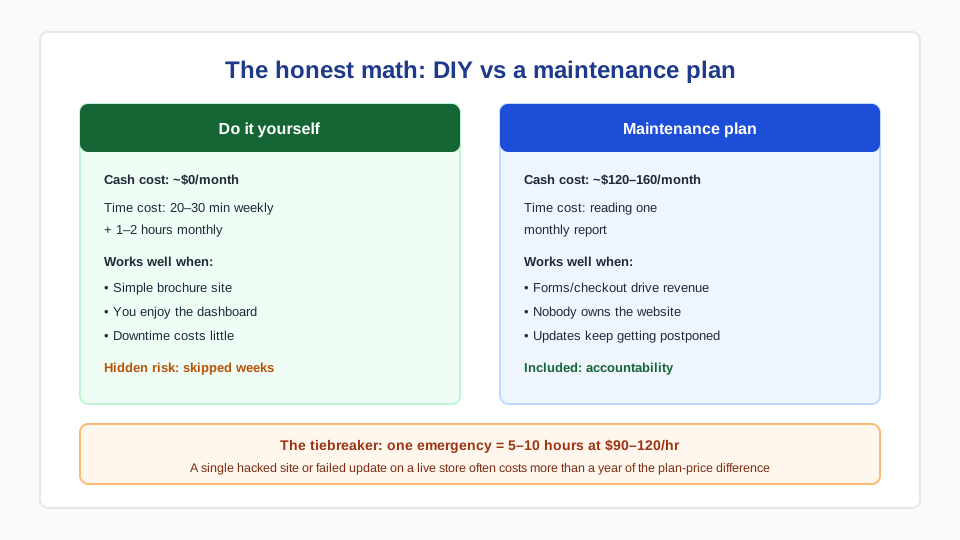
Doing the checklist yourself is realistic if your site is a simple brochure, you are comfortable in the WordPress dashboard, and an hour or two a month is genuinely available. The weekly rhythm above takes 20–30 minutes once practised; the monthly pass takes one to two hours including reading changelogs and testing.
The math changes when the site produces revenue. Metro Vancouver IT bills scheduled maintenance and approved repair work at one published rate: $90 CAD/hour. A monthly update cycle typically takes about two hours ($180 per scheduled cycle), while every-two-month, quarterly, every-four-month, and twice-yearly cycles typically take about three hours ($270 per scheduled cycle) because more updates accumulate between visits. The work is the same on every cadence; the difference is how often the full update and testing cycle happens.
Signals that you have outgrown DIY:
- Forms, checkout, or bookings drive measurable revenue and downtime is expensive.
- You are more than one WordPress version behind because updating feels risky.
- Nobody has ever tested a backup restore.
- Updates get postponed indefinitely after one bad experience.
- The person who “knows the website” left the company.
What to look for in a plan: a defined update cadence, off-site backups with a real restore path, uptime and vulnerability monitoring between visits, full post-update testing, a clear approval path for out-of-cycle security work, and plain-language reporting after each scheduled cycle. Compare our website maintenance services for the general checklist applied to any platform, and WordPress Care schedules for the WordPress-specific cadence options.
How Metro Vancouver IT maintains sites
Metro Vancouver IT provides maintenance and support, WordPress care, website speed optimization and hacked WordPress cleanup for businesses across Vancouver, Burnaby, Surrey and the rest of BC. If your current hosting is the bottleneck, we can plan a low-risk move to managed web hosting or managed WordPress hosting — and because we run both the hosting and the maintenance, nothing falls between the two.
Frequently asked questions
What does WordPress maintenance include?
Core, plugin and theme updates with pre-update backups; off-site backups and restore testing; security scans and login monitoring; uptime monitoring; performance and Core Web Vitals checks; form and checkout testing; database optimization; and small content edits. Good plans also include defined emergency response when something breaks between visits.
How often should WordPress plugins be updated?
Security releases should be applied within days — attackers begin scanning for newly disclosed plugin vulnerabilities almost immediately. Routine feature updates can batch into a monthly pass, done after a fresh backup and followed by testing forms and checkout. High-risk plugins (WooCommerce, page builders) deserve one-at-a-time updates with a look at the changelog.
How much does website maintenance cost in Canada?
Metro Vancouver IT uses one rate for maintenance and approved repair work: $90 CAD/hour. A monthly WordPress Care cycle typically takes about two hours ($180 per scheduled cycle). Every-two-month, quarterly, every-four-month, and twice-yearly cycles typically take about three hours ($270 per scheduled cycle). Daily backups, uptime monitoring, and vulnerability monitoring remain active between visits; billable out-of-cycle remediation is estimated and approved before it starts.
Is a WordPress maintenance plan worth it versus paying hourly?
Once a site drives revenue, usually yes. Hourly works when nothing breaks; the plan buys the prevention work actually happening on schedule — backups verified, updates tested, restores proven — plus a committed response when something breaks anyway. If your site is a simple brochure and you enjoy the dashboard, DIY with a quarterly professional check is a legitimate middle path.
Do I still need maintenance on managed WordPress hosting?
Yes, though less of it. Managed hosting typically covers server updates, daily backups and a firewall. It does not test your contact form, audit your plugin stack, fix conflicts after updates, review user accounts, or handle content changes. Hosting maintains the server; maintenance maintains your website.
What happens if a WordPress site is never maintained?
Risk compounds quietly: plugins fall behind until updating becomes dangerous, known vulnerabilities accumulate, forms and integrations fail without anyone noticing, and performance degrades as the database bloats. The typical ending is either a hack or a “big bang” update that breaks the site — both far more expensive than the maintenance would have been.