

WordPress troubleshooting · Email delivery
WordPress Password Reset Email Not Sending? 9 Fixes That Work
You clicked “Lost your password?”, WordPress said “Check your email”, and nothing ever arrived. A WordPress password reset not being sent is one of the most common lockout complaints we fix for Metro Vancouver businesses — and in almost every case the cause is one of nine things. This guide walks through them in the order that finds the problem fastest, plus two safe ways to get back into your site right now without waiting for email.
Why WordPress reset emails go missing
Out of the box, WordPress builds the password reset email and hands it to the web server’s PHP mail() function. There is no username, no password, no authentication — the server simply pushes the message onto the internet and hopes for the best. On shared hosting, that message leaves from an IP address shared with hundreds of other sites, some of which may have sent spam.
Modern inbox providers such as Gmail and Microsoft 365 check exactly the things this setup lacks: an authenticated sender, aligned SPF and DKIM records, and a sane sending reputation. When those checks fail, the reset email is filtered to junk or silently dropped. From your side it looks like WordPress is broken; in reality the message was sent and rejected somewhere along the way.
The other family of causes is on the WordPress side itself: a security or 2FA plugin intercepting mail, a hosting account that has hit its hourly email limit, or a site URL mismatch after a migration that makes reset links invalid. The fixes below cover both families, starting with the checks that take seconds.

Before you change anything: three quick checks
- Wait ten minutes and search all folders. Some mail servers throttle or grey-list first-time senders. Search your inbox, spam, junk, and (in Gmail) the Promotions and Updates tabs for “password reset”.
- Confirm the email address on the account. If you manage several sites or use aliases, it is surprisingly common to request a reset for a user whose address is an old or misspelled mailbox. Another admin can verify it under Users; if nobody can log in, you can check it in the database (fix 8).
- Try a different recipient. Ask WordPress to reset a user whose email lives on a different provider (for example a Gmail address if the main account is on your company domain). If that one arrives, the problem is delivery to your specific mailbox, not WordPress.
The 9 fixes, in the order to try them
Fix 1: Rule out spam filtering and inbox rules
Beyond the junk folder, check any mailbox rules, quarantine digests, or third-party filtering (Microsoft 365 quarantine, Google Workspace admin quarantine, Barracuda, Proofpoint). Company mail systems often quarantine unauthenticated messages without telling the recipient. If you find the reset email in quarantine, you have confirmed the message sends fine — skip straight to fix 5 and fix your authentication records.
Fix 2: Verify the user’s email address in the database
If you have another administrator account or database access, confirm the locked-out user’s address in the wp_users table (the user_email column). A stale address from an employee who left, or a typo made during setup, means the reset email is being delivered — to a mailbox nobody reads.
Fix 3: Test whether WordPress can send email at all
This is the test that cuts the problem in half. Install a mail-logging or test-email plugin (WP Mail Logging, or the test-email feature built into WP Mail SMTP and FluentSMTP) and send a test message.
- The test fails or errors: sending is broken on the server side. Continue with fixes 4, 6, and 7.
- The test “sends” but never arrives: sending works and delivery is failing. Continue with fixes 4 and 5.
Keep the logging plugin active afterwards — a visible send log turns every future “did it send?” mystery into a ten-second lookup.
Fix 4: Install and configure an SMTP plugin
This is the single highest-value fix on the list. An SMTP plugin (WP Mail SMTP, FluentSMTP, Post SMTP) reroutes all WordPress email through a real, authenticated mail account instead of anonymous server mail — your domain mailbox, Google Workspace, Microsoft 365, or a transactional email API such as Brevo, Postmark, or Amazon SES.

Configuration takes about fifteen minutes: create or choose the sending mailbox, generate an app password or API key, enter the SMTP host and port in the plugin, and send a test. Use a sending address on your own domain (for example [email protected]) so authentication records can align in fix 5.
Fix 5: Fix your SPF, DKIM, and DMARC records
Even with SMTP configured, email from your domain will struggle if DNS authentication records are missing or wrong. Three records matter:
- SPF — a TXT record listing which servers may send mail for your domain. Your SMTP provider or host publishes the value to include.
- DKIM — a cryptographic signature record proving the message was not altered. Enabled in your mail provider’s admin panel, then published in DNS.
- DMARC — a policy record telling receivers what to do when SPF/DKIM fail. Since 2024, Gmail and Yahoo effectively require it for reliable delivery.
Test by sending a message to a Gmail address and using “Show original” — it grades SPF, DKIM, and DMARC as pass or fail. All three should pass. If DNS is not something you touch comfortably, this is a quick task for whoever manages your domain — or for us as part of a WordPress login and access repair.
Fix 6: Check hosting email limits and blocked ports
Shared hosts commonly cap outgoing mail (for example 100–300 messages per hour) and some block outbound port 25 entirely. If your site sends order confirmations or newsletter mail from the same server, reset emails can be the ones that get dropped when the cap is hit. Ask your host two questions: “Is my account hitting an outbound mail limit?” and “Are any mail ports blocked?” Moving WordPress email to SMTP on ports 465 or 587 (fix 4) usually sidesteps both problems.
Fix 7: Rule out a plugin or theme conflict
Security plugins, 2FA plugins, custom login plugins, and even some page builders can intercept or break the reset flow. The clean test: temporarily deactivate plugins (all at once if you can afford a few minutes, or halves if not), then request a reset. If it works, reactivate plugins in groups until the culprit appears. If you cannot reach the dashboard, plugins can be disabled by renaming their folders over SFTP — the same technique we use in emergency website repair when a site is fully locked, and the same rescue move covered in our WordPress critical error recovery guide.
Fix 8: Reset the password manually (no email needed)
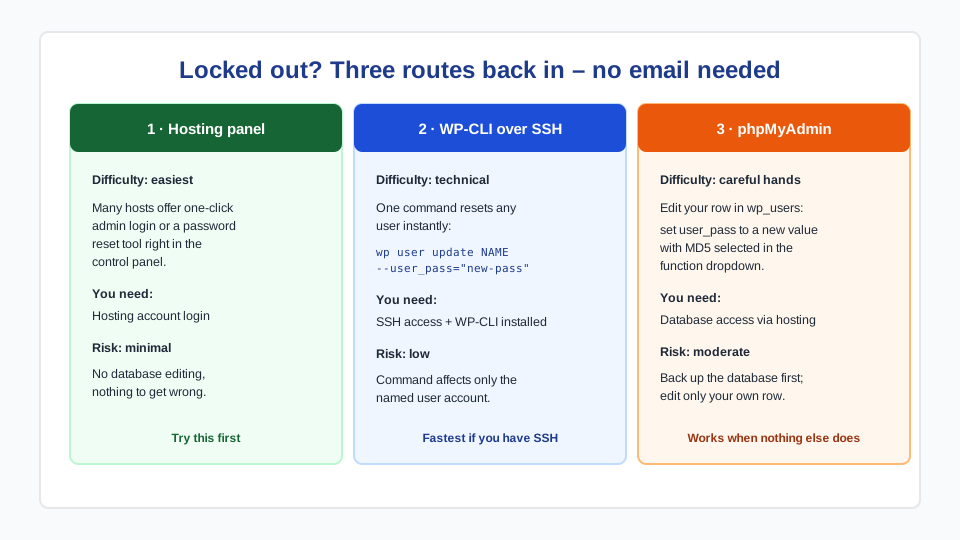
When you need access now, skip email entirely. Three safe routes, in order of convenience:
- Hosting panel: many hosts (including our managed WordPress plans) offer a one-click admin login or password reset directly from the control panel.
- WP-CLI: if you have SSH access,
wp user update YOUR_USERNAME --user_pass="a-strong-new-password"resets it instantly. - phpMyAdmin: open the database, find your user in
wp_users, and setuser_passto a new value using the MD5 function in the dropdown. WordPress upgrades the hash to its stronger format on your next login.
Take a database backup before editing anything, change only your own account, and use a password manager to generate the new password. If you are not comfortable inside phpMyAdmin, this is exactly the kind of ten-minute fix our WordPress admin access recovery service exists for — including verifying ownership first, so access is restored to the right person.
Fix 9: Check for a site URL mismatch after a migration
If resets broke right after a domain change, migration, or SSL switch, the reset link itself may be the problem: WordPress builds it from the siteurl and home values in wp_options. A mismatch (old domain, http vs https, stray www) produces links that error out or land on the wrong site. Confirm both values match your real address exactly. While you are there, make sure no old constants in wp-config.php (WP_HOME, WP_SITEURL) are overriding them.
When a “mail problem” is actually a security problem
Treat missing reset emails with suspicion if they arrive together with any of these: admin accounts you do not recognize, changed roles, a sudden logout of all users, or resets working for some accounts but never for administrators. Attackers who gain database access sometimes change admin emails so that resets go to them instead of you. In that situation, stop and check wp_users for unfamiliar accounts and recently changed email addresses before resetting anything — and consider a proper hacked site cleanup if anything looks wrong.
When to bring in a professional
DIY makes sense for the spam checks, the SMTP plugin, and the test email. Consider handing it off when the fix involves DNS records you have never edited, database changes on a live business site, a suspected compromise, or a lockout where nobody has any working admin, hosting, or email access. Those cases need ownership verification and a careful order of operations more than they need speed — and getting them wrong can make recovery harder. Our team handles login and admin access fixes for Metro Vancouver and remote BC clients, usually same-day.
Frequently asked questions
Why is WordPress not sending my password reset email?
Most often because WordPress sends mail through the web server with no authentication, and inbox providers filter or reject it. Other common causes: the account has an old email address, a security plugin is intercepting mail, the host has hit an outgoing email limit, or DNS records (SPF/DKIM/DMARC) fail spam checks. An SMTP plugin plus correct DNS records fixes the majority of cases.
How do I reset my WordPress password without the email?
Three safe options: use your hosting panel’s admin login or reset tool; run wp user update username --user_pass="newpassword" over SSH with WP-CLI; or edit the user_pass field for your user in phpMyAdmin using the MD5 function. Back up the database first and change only your own account.
Is resetting a password through phpMyAdmin safe?
Yes, when done carefully: take a database backup, edit only the user_pass value for the correct row in wp_users, and select MD5 in the function dropdown. WordPress automatically re-hashes the password with its stronger algorithm the first time you log in. If you are unsure which row is yours, verify by the user_login and user_email columns before editing.
Will an SMTP plugin fix reset emails permanently?
Usually, yes — it replaces unauthenticated server mail with delivery through a real mail account that passes provider checks. To make it durable, pair it with correct SPF, DKIM, and DMARC records for your domain and keep the plugin’s email log enabled so future failures are visible immediately instead of silent.
Why does my reset link say it is invalid or expired?
Reset links are single-use and expire within 24 hours. They also break when the site URL in the database does not match the real domain (common after migrations or an HTTP-to-HTTPS switch), when a security plugin regenerates keys, or when a mail system rewrites the link for “safe link” scanning. Request a fresh link and click it directly; if it still fails, check the siteurl and home values in wp_options.
Reset emails stopped after we moved hosts. What should I check first?
Two things: the site URL values (siteurl and home) in the new database, and your SPF record — it probably still lists the old host as the permitted sender. Update the SPF record to match the new server or, better, configure SMTP so your email delivery no longer depends on which web host you use.