


WordPress SEO · BC small business
WordPress SEO Checklist for BC Small Businesses (2026)
Most WordPress SEO advice is written for bloggers chasing traffic. This checklist is for something more specific: a BC small business that wants its WordPress site to show up when nearby customers search for what it sells. It covers the technical foundation, on-page structure, local signals, and content system — in the order that actually moves rankings — plus an honest section on what to do yourself and when hiring WordPress SEO services or a WordPress SEO expert is worth the money.
What makes WordPress SEO different
WordPress gives you full control over everything Google measures — URLs, titles, markup, speed, structured data. That control cuts both ways. A lean, well-configured WordPress site outranks page builders and website builders with ease; a bloated one, dragged down by a heavy theme, twenty plugins, and cheap hosting, struggles no matter how good the content is.
The practical consequence: WordPress SEO is 50% housekeeping. Before touching keywords, make sure the machine underneath is sound. That is also why this checklist starts at the bottom of the pyramid, not with content.

Layer 1: Technical foundation
- Confirm Google can index the site. In WordPress: Settings → Reading → “Discourage search engines” must be unchecked. Sites go live with this ticked more often than anyone admits.
- Run everything on HTTPS with one canonical version of the domain —
https://yoursite.ca, not a mix of www and non-www that splits your authority. - Set clean permalinks (Settings → Permalinks → “Post name”). Short, readable URLs that never change.
- Install one SEO plugin — Yoast, Rank Math, or SEOPress — and let it generate your XML sitemap, canonicals, and meta fields. Submit the sitemap in Google Search Console.
- Set up Google Search Console (free) and check the coverage report monthly. It tells you exactly what Google can and cannot see.
- Kill duplicate content paths: tag archives, date archives, and attachment pages you don’t use should be noindexed in the SEO plugin.
- Check PHP and hosting. An outdated PHP version and oversold shared hosting slow every page. Speed is a technical-layer property first, a plugin property second — our website speed service exists because this layer is where most WordPress performance problems actually live.
Layer 2: On-page structure
- One H1 per page that says what the page is about in plain words. Many themes bury or duplicate H1s — check with a browser inspector.
- Write titles like search results, not labels. “Plumbing Services in Kamloops | YourCompany” beats “Services”. Keep them under ~60 characters with the key phrase early.
- Meta descriptions sell the click: 140–160 characters, one clear reason to choose your page. They don’t affect ranking directly, but they move click-through rate, which matters.
- Use headings as an outline (H2 for sections, H3 within) so both readers and Google can skim the page structure.
- Internal links with meaningful anchors. Link your service pages to each other and from blog posts using descriptive anchor text — “WordPress maintenance checklist”, not “click here”. Internal linking is the most underused free ranking lever on small sites.
- Alt text on every meaningful image — describe the image, mention the topic naturally, skip keyword stuffing.
- Let the SEO plugin emit schema (Organization, LocalBusiness, breadcrumbs, FAQ). One source of schema only; two plugins emitting duplicate markup is a common self-inflicted wound.
Layer 3: Local BC signals
For searches like “web design Surrey” or “accountant Langley”, Google blends the normal results with the local map pack — and different signals drive each.
- Claim and complete your Google Business Profile. Categories, services, hours, photos, and a steady trickle of reviews. For many local searches this single free listing outweighs months of on-site work.
- Keep NAP consistent — the exact same business name, address, and phone number on your website footer, GBP, and every directory that lists you.
- Put your service area in writing on the site: the cities you actually serve, mentioned naturally on service pages and the contact page.
- City pages: quality over quantity. One genuinely local page per priority city — real neighbourhood knowledge, local examples, unique copy — beats twenty templated pages that all say the same thing with the city name swapped. Google has seen the template trick for fifteen years.
- Earn a few local links: chamber of commerce, industry association, local supplier pages. A handful of real BC links moves a small site more than a hundred directory submissions.
Layer 4: A content system (not random blog posts)
Once the foundation works, content becomes the growth engine — if it is systematic. The pattern that works for small business:
- One page per service you sell, each targeting the phrase a customer would actually type.
- Supporting articles that answer real questions customers ask before buying — costs, comparisons, how-tos, “what to look for” guides — each linking to the service page it supports.
- A sustainable cadence. One useful article a month, every month, beats eight articles in January and silence until fall.
- Refresh instead of only adding. Update prices, dates, and screenshots in your best-performing pages yearly; Google notices maintained content. (The same logic as website maintenance — rankings decay without upkeep too.)
Measure with Search Console, not vibes
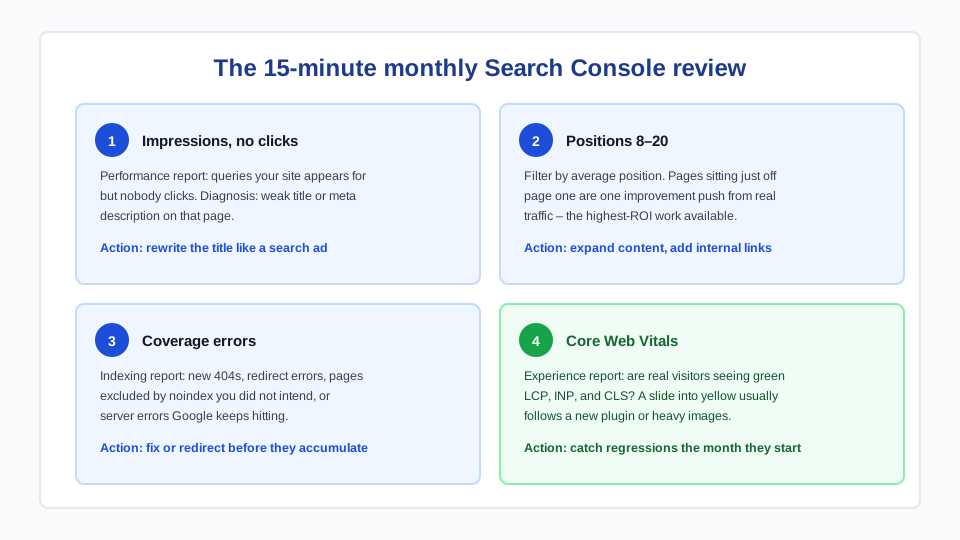
Google Search Console answers the only questions that matter: which queries show your site, which pages get impressions but no clicks (title/description problem), and which pages sit at position 8–20 (one improvement push from real traffic). Check it monthly. Ignore rank-checking anxiety tools until the basics above are done.
DIY vs hiring a WordPress SEO expert

Everything in the left column is genuinely doable by a motivated owner in a few evenings — and doing it yourself builds understanding that makes you a better client later. The right column is where a WordPress SEO expert earns their rate: technical audits, migrations and redesigns without ranking loss, Core Web Vitals engineering, schema beyond plugin defaults, and diagnosing why rankings dropped. In the BC market, expect roughly $90–150/hour for competent help; be skeptical of cheap monthly “SEO packages” that never show you what work was done.
What to ask any WordPress SEO company before signing: What specifically will you change in the first 90 days? Will all work be on our site and accounts (not a private network we lose if we leave)? Can we see a before/after example for a business like ours? Vague answers to concrete questions are the reliable red flag. Our WordPress SEO services page shows how we scope this work — technical fixes first, always with a written record of what changed.
Frequently asked questions
Do I need an SEO plugin on WordPress?
Yes — one. Yoast, Rank Math, and SEOPress all handle the essentials: titles and meta descriptions, XML sitemaps, canonicals, and basic schema. The differences between them matter far less than configuring whichever you pick correctly and never running two at once.
Is Yoast or Rank Math better for small business?
Both are excellent for a small-business site, and the free tiers cover everything in this checklist. Rank Math bundles more features free (schema types, redirects); Yoast is older with a longer track record. If your site already has one installed and configured, keep it — switching costs attention better spent on content and local signals.
How long does WordPress SEO take to show results?
Technical fixes (indexing problems, duplicate content, broken titles) can show movement in two to six weeks. Competitive local terms typically take three to six months of consistent work — a completed Business Profile, real city pages, and monthly content. Anyone promising first-page rankings in weeks for competitive terms is describing luck or spam.
What does a WordPress SEO expert cost in Canada?
Competent independent consultants and small agencies in BC typically charge $90–150/hour. One-time technical audits commonly run $500–1,500 depending on site size; ongoing engagements $500–2,000/month. The cheap end of monthly “SEO packages” usually buys reporting, not work — ask exactly what changes will be made on your site each month.
Does hosting affect WordPress SEO?
Meaningfully, yes. Hosting determines your server response time (the floor under every speed metric), uptime, PHP version, and whether Core Web Vitals are winnable at all. Moving a slow site from oversold shared hosting to decent managed WordPress hosting is often the single biggest speed improvement available — before any plugin tuning.
Can I rank without writing blog posts?
For your own name and a handful of low-competition local terms, yes — solid service pages plus a complete Google Business Profile can be enough. For anything competitive, supporting content is how you cover the questions customers search before buying, earn internal links to your money pages, and give Google evidence of topical depth. One good article a month is sufficient cadence.