

Website troubleshooting · Error library
503 Service Unavailable: What It Means and How to Fix It
A 503 error means the server is alive but temporarily unable to handle requests — the web equivalent of a shop with the lights on and a “back in 15 minutes” sign. Sometimes it really does fix itself in minutes. Sometimes the sign stays up until someone finds the stuck maintenance file, the crashed PHP process, or the plugin eating the server. This guide covers what a 503 means, the seven causes behind almost all of them, and how to fix each — whether you are a visitor or the site owner.
What a 503 actually means
HTTP status codes in the 5xx range mean “the server failed”, and each number narrows down how. A 503 Service Unavailable specifically means the server received the request, is functioning at some level, but is currently unwilling or unable to process it. Built into the definition is the expectation that the condition is temporary — which is why browsers, crawlers, and monitoring tools all treat a 503 as “try again later” rather than “this site is dead”.
That framing matters for diagnosis: something is deliberately or protectively refusing work. The question is what — a maintenance flag, an overloaded process pool, a resource cap, or a security layer.

If you are a visitor: three things to try
- Refresh once after a minute. Genuine overload 503s often clear quickly.
- Check whether it is just you — a down-detector site or a friend on a different network settles it. If the site works for others, the block may be your IP tripping a security rule.
- Come back later. There is nothing else a visitor can fix; the problem is on the server side. If you need the business urgently, phone them — they may not know their site is down.
If you own the site: the seven causes and their fixes

1. The server is genuinely overloaded
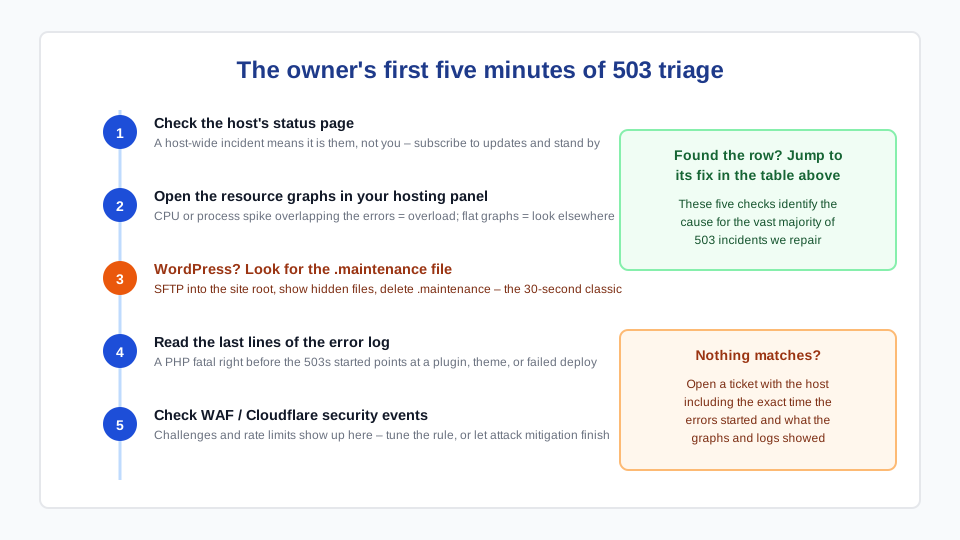
A traffic spike (a promotion, a viral post, or a bot swarm), a runaway cron job, or a plugin doing heavy work can exhaust the server’s worker processes; new requests get 503s until capacity frees up. Look at your hosting panel’s CPU and process graphs — a spike overlapping the errors confirms it. The fix that lasts: aggressive page caching (so traffic stops hitting PHP), and hosting sized for your actual peaks rather than your quiet Tuesdays.
2. WordPress stuck in maintenance mode — the classic
During every update, WordPress creates a hidden .maintenance file in the site root and serves a 503 until the update finishes. If the update is interrupted — timeout, connection drop, clicking away mid-update — the file stays and the site serves “Briefly unavailable for scheduled maintenance” forever. The fix takes 30 seconds: connect via SFTP or your hosting file manager, show hidden files, and delete .maintenance from the site root. Then finish the interrupted update properly, because half-updated plugins cause their own problems — see our critical error recovery guide for that scenario.
3. The PHP backend crashed
The web server (Nginx/Apache) is up, but the PHP process pool behind it died or hit its limits — so the web server has nothing to hand requests to and returns 503 (or 502, depending on configuration). On managed hosting, the host restarts these automatically; on a VPS, restart PHP-FPM and read its log to learn why it died. Repeated crashes usually trace to memory exhaustion — which circles back to a heavy plugin or an undersized plan.
4. A fatal error surfacing as a 503
Some server configurations wrap application fatals in a 503 page rather than a 500. If the 503 started right after a plugin or theme update, treat it exactly like the WordPress critical error: read the PHP error log, identify the failing extension from the file path, and disable it by renaming its folder over SFTP.
5. Hosting resource limits
Shared hosts cap CPU seconds, memory, processes, and database connections per account. Hit a cap and the host serves errors until usage drops — some report it honestly as “resource limit reached”, others as a generic 503. Your hosting panel’s usage graphs identify the culprit and the time pattern (daily backup? cron? one hungry plugin?). Either reduce the load or accept that the site has outgrown the plan.
6. WAF, rate limiting, or DDoS protection
Cloudflare and host-level firewalls return 503s while challenging suspicious traffic or mitigating an attack. If you use Cloudflare, check the security events log: you will see whether visitors are being challenged and by which rule. Legitimate visitors caught by over-tight rules need the rule tuned; an actual attack means the 503s are the protection working — let it.
7. A failed deployment or server change
If the 503 began right after a deploy, a PHP version switch, or a server configuration change — that change is the cause until proven otherwise. Roll it back, confirm services restarted cleanly, and re-apply the change with the missing step. This is why changes on production sites belong in maintenance windows with a rollback plan.
Does a 503 hurt SEO?
Short answer: brief 503s are harmless, long ones are not. Google treats 503 as the correct signal for temporary downtime — crawlers back off and retry, and nothing is deindexed over an outage of hours. If downtime stretches to days, Google begins treating the pages as genuinely gone, and rankings suffer. Two rules for planned maintenance: serve a real 503 status (not a “we’ll be back” page returning 200, which gets indexed as your content), and include a Retry-After header so crawlers know when to come back.
Preventing the next one
- Uptime monitoring with alerts — learn about 503s from a ping, not a customer. Free tiers of UptimeRobot and similar are enough.
- Right-sized hosting with page caching — most overload 503s are cache problems wearing a traffic costume. Our Core Web Vitals guide covers the caching layers that also protect capacity.
- Update through the checklist — interrupted updates cause cause #2; the routine in our maintenance checklist prevents them.
- Know your resource graphs before the incident, so “is this normal?” has an answer at 9 p.m. on launch night.
Frequently asked questions
Is a 503 error my fault or the hosting company's?
Either — the status code alone doesn’t say. Overloads caused by your plugins, stuck maintenance mode, and failed updates are on the site side; crashed server processes, host-wide outages, and resource caps are on the hosting side. The hosting error log and resource graphs usually settle it in minutes. If the host’s status page shows an incident, it is them; if your CPU graph spiked when the errors started, it is the site.
How long do 503 errors usually last?
Overload 503s typically clear in minutes as traffic subsides. Stuck maintenance mode lasts until someone deletes the .maintenance file — potentially forever if nobody notices. Crashed backends last until restarted (seconds on good managed hosting). The dangerous pattern is recurring brief 503s at busy times: that is a capacity problem that will keep happening until the cause is fixed.
Does a 503 error hurt my Google rankings?
Not if it is brief — 503 is precisely the signal that tells crawlers “temporary, retry later”, and outages of hours have no lasting effect. Extended downtime (days) leads Google to start dropping pages. For planned maintenance, serve a genuine 503 status with a Retry-After header rather than a “down for maintenance” page that returns 200, which can get indexed in place of your content.
What is the difference between 500, 502, 503, and 504 errors?
500 means the application broke while building the page (a code error). 502 means a proxy got an invalid response from the backend (backend crashed). 503 means the server is temporarily refusing requests (overload, maintenance, protection). 504 means the backend was too slow and the proxy gave up (hung query, slow API). The distinction matters because each points to a different log and a different fix.
How do I fix a WordPress site stuck in maintenance mode?
Connect to the site over SFTP or your hosting file manager, enable “show hidden files”, and delete the .maintenance file in the WordPress root directory (the folder containing wp-config.php). The site returns immediately. Then re-run the update that was interrupted — one plugin at a time, after a backup — so you don’t trade a 503 for a half-updated plugin conflict.