


Industry guide · Website development for law firms
Law Firm Website Requirements in BC: Trust, Intake, Privacy and SEO
A law firm website has a harder job than most business sites. It must convince someone in a stressful moment to trust you with their divorce, their business dispute, or their estate — while respecting Law Society marketing rules, handling enquiries that touch confidential matters, and competing in local search against every other firm in town. This guide covers what a BC law firm website actually needs before you brief a developer: the trust signals, the intake flow, the privacy obligations, and the practice-area SEO structure that brings files in the door.
What prospective clients check in the first minute

Legal clients do more diligence than almost any other buyer — they are about to share their most sensitive problems and often significant money. The website elements that pass their check:
- Real lawyers, visible. Professional photos, plain-language bios, year of call, education, and languages spoken. A “team” page of stock photos is a trust-killer specific to this industry.
- A headline that says who you help. “Family law for Surrey and the Fraser Valley” beats a Latin motto. Visitors in stress skim; make the match obvious.
- Practice areas as real pages, not a bullet list — each explaining the process, what to expect, and typical questions in that area of law.
- Social proof that sounds human. Google reviews embedded or quoted (with the reviewer’s consent), peer recognitions, community involvement. Follow the marketing rules on this — see below.
- Contact that requires no courage: a tappable phone number, a short form, and ideally online consultation booking. Every extra field loses someone who was barely ready to reach out.
Law Society of BC marketing rules: design for compliance
Lawyer marketing in BC is governed by the Law Society’s rules on marketing activities (BC Code, section 4.2): in short, marketing must be accurate and verifiable, not misleading, and consistent with the profession’s standards. This is not legal advice — your firm knows the Code better than your web developer does — but the website implications are practical:
- Claims must be supportable. “Vancouver’s best personal injury firm” invites problems; “serving personal injury clients in Vancouver since 2004” does not.
- Past results need careful handling. Outcomes depend on facts; presenting settlements or verdicts as predictive is where firms get into trouble. Many BC firms simply avoid dollar figures on the site.
- Testimonials should be genuine and verifiable — real clients, real words, permission obtained. Linking your actual Google profile is safer than curated quotes with initials.
- Specialist claims are restricted. Unless a recognized designation applies, “practising primarily in family law” is the safe framing, not “family law specialist”.
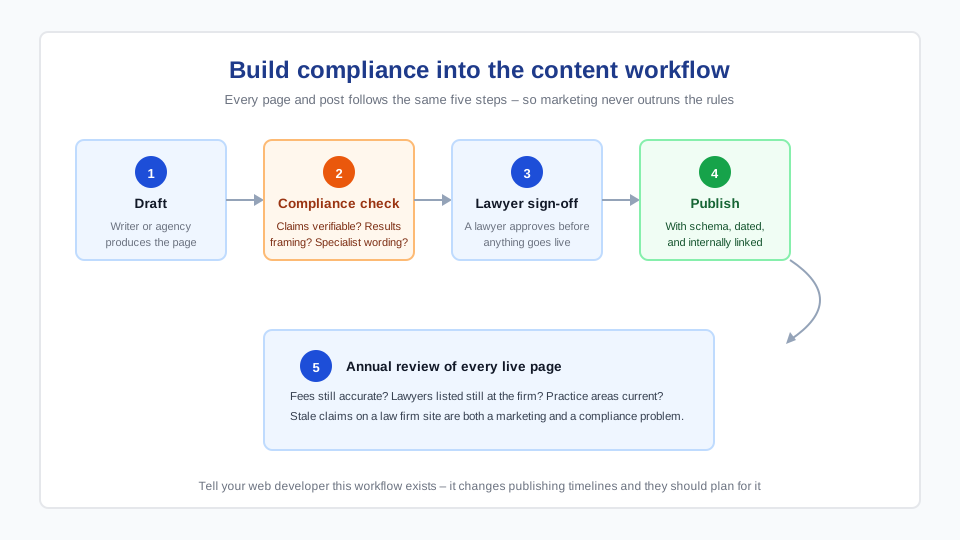
- Build a review step into content workflow: a lawyer signs off every new page before it publishes. Your developer should expect and plan for this — it changes timelines.
Privacy: PIPA applies to your contact form
BC’s Personal Information Protection Act (PIPA) governs how private organizations — including law firms — collect, use, and store personal information. Your website is a collection point, so decisions that are usually afterthoughts become requirements:
- Collect the minimum. Name, contact method, and a general matter type is enough to start a conversation. Do not invite case details in a web form — and say so: “Please don’t include confidential details; we’ll discuss specifics securely.”
- Secure the pipe. HTTPS everywhere, form submissions delivered over authenticated email or into a system the firm controls — not a free plugin mailing plaintext to a personal Gmail.
- Know where data lives. Which server, which country, which third-party services (form tools, analytics, chat widgets) see submissions. A conflict check tool or client portal raises the bar further.
- Publish a privacy policy that reflects what the site actually does — and a disclaimer that contacting the firm does not create a solicitor-client relationship. Standard, but frequently missing on DIY sites.
- Retention applies to form entries too. If submissions are stored in the website database, someone must own deleting them on schedule — a natural task for routine website maintenance.
Intake: the funnel your website must support

- Offer both form and booking. Some clients want to type three sentences at midnight; others want a consultation slot on a calendar. Calendly-style booking synced to lawyer availability converts the second group without phone tag.
- Route enquiries reliably. Form submissions should notify a monitored inbox (and ideally a backup), with delivery through authenticated SMTP so nothing silently disappears into spam — the failure mode we repair constantly on professional-services sites.
- Set response expectations on the page. “We respond to enquiries within one business day” — then meet it. In legal intake, the firm that answers first wins a striking share of files.
- Mobile is the intake device. Stressful legal searches happen on phones at odd hours. Tap-to-call, short forms, readable type.
Practice-area SEO: the structure that brings files in
Legal search is intensely local and intent-driven: “employment lawyer burnaby”, “separation agreement lawyer surrey”. The structure that captures it is simple and takes discipline rather than tricks:
- One page per practice area, each answering what clients in that situation actually search: the process, timelines, costs where you can be honest, and FAQs. Thin pages listing every practice area in two sentences each rank for nothing.
- One page per priority location if you genuinely serve multiple cities — with real local content (courthouse, registry, community specifics), not the same page with the city name swapped.
- FAQ schema on practice pages so common questions can surface directly in results.
- A complete Google Business Profile per office, with reviews accumulating steadily — for “near me” searches this outweighs most on-site work.
- Technical hygiene: fast hosting, mobile performance, clean titles. The fundamentals in our WordPress SEO checklist apply to firms unchanged.
Build notes: platform, security, and who maintains it
- WordPress is the sensible default for firm sites: full ownership, every intake/booking/CRM integration available, and no platform ceiling — the reasons detailed in our law firm website development service.
- Security posture matters more than average. A defaced or hacked law firm site is a reputation event, not an inconvenience. Managed hosting with WAF and daily backups, 2FA on admin accounts, and prompt updates are table stakes.
- Accessibility is both ethics and audience: WCAG-minded contrast, keyboard navigation, and readable typography — a meaningful share of legal clients are older or using assistive tech.
- Plan maintenance from day one. Someone must own updates, backups, form testing, and the PIPA-driven data cleanup above. Firms rarely have that person in-house; a care plan usually costs less than one billable hour a month.
- Budget realistically: a proper firm site is a business-website project — typically $4,000–$10,000 built professionally in BC, per our website development cost guide, plus intake integrations.
Frequently asked questions
What pages does a law firm website need?
At minimum: a homepage that states who you help, one page per practice area, individual lawyer bio pages with photos and credentials, a contact page with form, phone, and booking, plus a privacy policy and website disclaimer. Firms serving multiple cities add genuinely local pages per location. A blog answering common client questions strengthens both trust and search visibility.
How much does a law firm website cost in BC?
A professionally built firm site typically runs $4,000–$10,000 CAD — custom design, practice-area pages, secure intake forms, and booking integration. Solo practitioners can land near the lower end with a focused scope. Ongoing costs (hosting, maintenance, licences) add roughly $100–250/month. Cheap templated “lawyer marketing” packages usually cost more over three years and rank worse.
Can BC lawyers use client testimonials on their website?
Testimonials are generally permitted when they are genuine, verifiable, and not misleading — consistent with the Law Society of BC’s marketing rules. Real reviews on your Google profile, quoted with permission, are the safest pattern. Avoid anything implying guaranteed outcomes or presenting past results as predictive. When in doubt, have a lawyer review marketing copy before it publishes — build that step into the content workflow.
How do law firms rank in local search?
Three pillars: a complete Google Business Profile per office with steadily accumulating reviews; one substantial page per practice area (and per genuinely served city) answering what clients search; and technical basics — fast mobile performance, clean titles, FAQ schema. Legal SEO rewards depth and patience; directories and paid “exclusive lead” services are supplements, not the strategy.
Is a website contact form confidential enough for legal enquiries?
Treat web forms as a first-contact channel, not a confidential one. Collect the minimum (name, contact method, matter type), tell visitors not to include case details, deliver submissions over HTTPS and authenticated email, and know which third-party services can see the data — that is the PIPA-aligned setup. Confidential details belong in the consultation, after conflict checks.
Who should maintain a law firm's website?
Someone accountable — which in most small firms means a maintenance partner rather than “whoever set it up”. The site needs software updates, verified backups, security monitoring, form delivery testing, and periodic cleanup of stored form submissions. A monthly care plan typically costs less than a single billable hour and prevents the reputation risk of a hacked or silently broken site.