


Platform migration · Wix → WordPress
Wix to WordPress Migration: A No-Downtime, SEO-Safe Checklist
Wix is a genuinely good way to get a business online fast. It is also a platform many businesses outgrow — usually the year they get serious about SEO, need an integration Wix doesn’t offer, or notice the app fees stacking up. The catch: there is no “export to WordPress” button, and a careless migration can burn rankings the Wix site spent years earning. This checklist covers the whole move — what transfers, what must be rebuilt, and the redirect work that keeps Google happy — with zero downtime.
Why businesses outgrow Wix

The three complaints that actually drive migrations, in the order we hear them:
- SEO ceilings. Wix has improved, but you still don’t fully control URL structure, schema, server performance, or the fine-grained technical details that competitive rankings need. If search traffic is your growth plan, WordPress gives you every lever — our WordPress SEO checklist shows what becomes possible after the move.
- Integration walls. The moment you need a specific CRM sync, a Canadian payment or shipping setup, a members area, or a booking flow Wix’s app market doesn’t cover, you are stuck. WordPress integrates with effectively everything.
- Costs at scale. Wix plans plus premium apps routinely reach $60–100+/month. A comparable WordPress setup on managed hosting runs less — though the honest comparison includes maintenance, which becomes your job or your partner’s (see the trade-off above).
If none of those pinch yet, stay on Wix — migrating for its own sake is cost without benefit. If two of three sound familiar, read on.
What transfers, what gets rebuilt
| Asset | Transfers? | How |
|---|---|---|
| Blog posts | Yes | Wix RSS feed import or migration tools; verify formatting and images after |
| Pages (home, services, about) | No — rebuilt | Copy is reusable; layouts are rebuilt in the WordPress theme (usually better) |
| Images | Mostly | Download from Wix, re-upload at proper sizes with alt text; some are locked in galleries |
| Design/theme | No | Choose or build a WordPress theme; treat it as the redesign it is |
| Forms & submissions | Forms rebuilt; export old entries | Wix form data exports to CSV; new forms via a WordPress form plugin |
| Wix Stores products | Yes, with work | CSV export → WooCommerce import; customer accounts do not transfer |
| Domain | Yes | Stays at your registrar (or transfers out of Wix); only DNS changes |
| Unaffected if handled | If email runs through Wix/Google via Wix, plan its continuity before DNS changes |
The five-phase, no-downtime plan

Phase 1: Audit the Wix site before touching anything
- Export every URL: crawl the site (Screaming Frog’s free tier handles small sites) or walk the sitemap at
yoursite.com/sitemap.xml. - In Google Search Console, note which pages actually get impressions and clicks — these are the URLs your redirect map must treat as precious.
- List every form, booking widget, gallery, and app integration, and decide its WordPress equivalent up front.
- Screenshot key pages — layout decisions go faster with the old design open beside the new.
Phase 2: Build WordPress on staging
Set up hosting (this is the moment to choose quality — managed WordPress hosting determines your speed floor for years), install WordPress at a temporary address, and build the theme and page structure. Keep URLs short and logical; you are designing the permanent structure the redirect map will point at. The Wix site stays live and untouched throughout.
Phase 3: Migrate the content
- Blog posts: import via the Wix RSS feed (append
/blog-feed.xml) using WordPress’s RSS importer, or use a migration plugin. Expect to fix embedded images and formatting on the most important posts by hand. - Pages: copy the text, rebuild the layout. Resist pasting Wix’s markup — clean content in the new theme is the point of the exercise.
- Images: download originals where you have them; re-upload compressed versions with descriptive filenames and alt text. This alone often improves page speed dramatically.
- Store data: Wix Stores exports products to CSV for WooCommerce import. Do a test order end-to-end on staging, including Canadian taxes and shipping.
Phase 4: Map every redirect (the SEO-critical step)
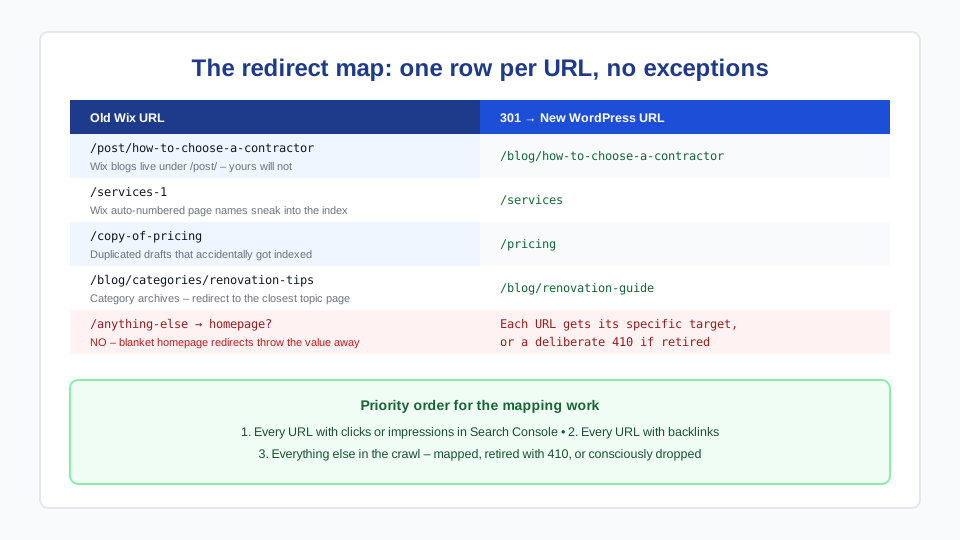
Build a two-column spreadsheet: every old Wix URL → its new WordPress URL. Watch for Wix’s URL quirks, which is where maps usually go wrong:
- Wix blog posts live under
/post/slug— your WordPress posts probably won’t; each needs its own row. - Duplicated pages named
/copy-of-somethingthat accidentally got indexed. - Category and tag pages under
/blog/categories/…— redirect them to the closest topic page rather than letting them 404.
Implement the 301s in WordPress with a redirect plugin (or at the server level). Every URL with traffic or backlinks gets a specific target — blanket-redirecting everything to the homepage throws away most of the value. This is the same discipline behind our redesign-without-losing-SEO process; the platform changes, the principle doesn’t.
Phase 5: Cut over DNS and verify
- Lower the domain’s DNS TTL a day or two ahead so the switch propagates fast.
- Point the domain’s A record (or nameservers) at the new WordPress hosting.
- Confirm SSL is issued and the site loads clean on the real domain.
- Spot-check the top 20 redirects from your map, submit the new XML sitemap in Search Console, and test every form with a real submission.
- Watch Search Console coverage and rankings weekly for a month. A temporary wobble is normal; a cliff means a redirect problem — fix fast.
- Keep the Wix subscription until you are confident, then cancel. (Follow the same care as any site retirement — our guide to safely decommissioning a site applies in reverse.)
What it costs and how long it takes
A typical small-business Wix site (10–20 pages, a blog, forms) migrates in 3–5 weeks. Done professionally in the BC market, expect $2,500–$8,000 depending on page count, store complexity, and how much design improvement is bundled in — in practice a migration is usually also a redesign, which is why the ranges match our website development cost guide. DIY is realistic for a small site if you are comfortable with the redirect work; that spreadsheet is the part worth paying for if you are not.
After launch, WordPress needs what Wix bundled: updates, backups, and security. Budget for hosting plus a care plan, or plan to run the maintenance checklist yourself.
Frequently asked questions
Can I transfer my Wix site directly to WordPress?
Not wholesale — Wix has no full export. Blog posts transfer via the RSS feed or migration tools; pages, design, and forms are rebuilt in WordPress. Your domain moves with a DNS change, and images can be downloaded and re-uploaded. In practice the rebuild is where sites get faster and cleaner, so treat it as an upgrade, not a loss.
Will I lose SEO moving from Wix to WordPress?
Not if the migration includes a complete redirect map: every old Wix URL 301-redirected to its specific new equivalent, especially the /post/ blog URLs. Expect minor fluctuation for a few weeks while Google recrawls. Rankings fall off a cliff only when redirects are skipped or everything is pointed at the homepage — both avoidable.
How long does a Wix to WordPress migration take?
Three to five weeks for a typical small-business site: one week of audit and setup, one to two weeks building and migrating content on staging, and a final week for redirects, testing, and the DNS cutover. The old site stays live the whole time, so the deadline pressure is calendar, not downtime.
What does it cost to move from Wix to WordPress?
Professionally, $2,500–$8,000 CAD for most small-business sites, scaling with page count, store complexity, and design scope. DIY costs your time plus hosting (from a few dollars a month) and perhaps a premium theme. Ongoing, WordPress hosting plus maintenance typically runs less than a loaded Wix plan with premium apps — but only if maintenance actually happens.
Can I keep my domain and email when leaving Wix?
Yes. If the domain is registered outside Wix, only its DNS records change. If it was registered through Wix, transfer it to a registrar you control (or keep it at Wix and just repoint DNS). Email is separate: if your mailboxes were set up through Wix’s Google Workspace bundle, confirm the subscription and MX records survive the move before changing DNS.